The garage is the most popular space in America for a home golf simulator — and for good reason. It's already separate from your living space, it can handle the mess, and most people aren't using all of it. With the right setup, a garage becomes one of the best simulator environments you can build.
But garage builds come with real constraints that a generic simulator guide won't tell you about: ceiling heights that may or may not support overhead monitors, single-car dimensions that require smart planning, temperature swings that affect equipment, and the permanent-vs-retractable decision that shapes the entire project.
This guide walks you through every decision in the right order — so you end up with a setup that actually fits your space, works the way you want it to, and doesn't require a do-over six months later.
Step 1: Measure Your Space — This Determines Everything
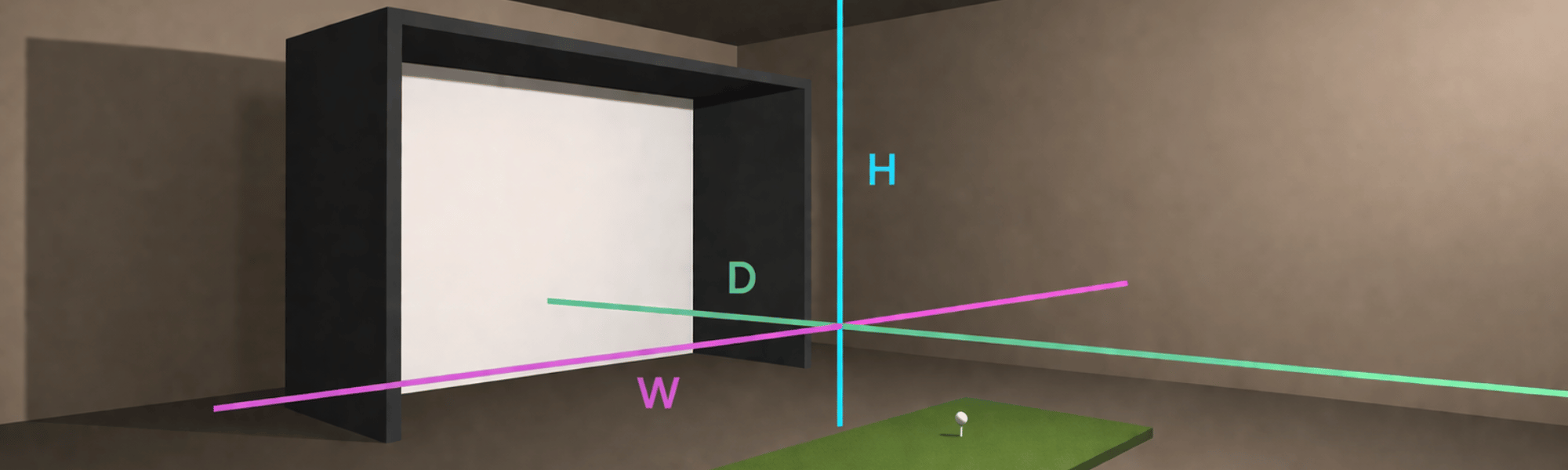
Before you look at a single product, grab a tape measure. Your garage dimensions dictate which launch monitors are even an option and what enclosure size you can realistically fit. Three measurements matter most:
Ceiling height is the most critical. This single number determines whether you can use an overhead launch monitor — which eliminates floor clutter and gives you a cleaner, more professional feel — or whether you're working with a ground-based unit positioned to the side of your hitting area. Overhead monitors need at least 8'10" to 9' of clearance. If your garage ceiling is 8' or below, you're in ground-based territory, and that's completely fine.
Depth — the distance from your hitting position to the screen — affects safety and monitor performance. As a general rule, plan for approximately 16 feet of total depth in your simulator bay: roughly 10 feet from the golfer to the screen, plus another 6 feet behind the golfer so you're not swinging close to a wall or obstruction. A standard dedicated garage bay (typically 18–22 feet deep) handles this comfortably.
Width affects your enclosure choice and whether you need to be precise about positioning. A single-car garage is typically 10–12 feet wide. A double-car garage opens up 20+ feet of width, which gives you much more flexibility for enclosure size, side walls, and permanent framing.
⚠️ Under 9 Feet Ceiling
We generally don't recommend ceiling heights below 9 feet for a golf simulator — not because of the monitors themselves, but because of your golf swing. A ceiling that's too low compresses your backswing, forces you to make compensations, and turns every session into a bad habit factory. You can technically hit balls in a lower space, but you won't be swinging freely, and that defeats the purpose.
If this is your only option, focus on short game practice and half swings — and start planning for a taller space when you're ready to build properly.
✅ 9 Feet or Higher
At 9 feet and above, you have full clearance for a natural, uninhibited golf swing — which is the whole point. You also unlock the full range of monitor options, including overhead units that mount above the hitting area and keep your floor completely clear.
- VTrack (8'10" min overhead clearance)
- ProTee VX (9' min overhead clearance)
- + all ground-based options
A Real Example: Single-Car Garage, 8×8 Enclosure

Kyle's personal garage simulator — an 8×8 fixed enclosure in a single-car bay. Proof that you don't need a double garage or a dedicated room to build something great.
This is Kyle's personal setup — a fully functional golf simulator built into a single-car garage bay using an 8×8 enclosure. It's a fixed structure (not retractable), and it proves a point: you don't need a massive space to get a great sim build. The enclosure keeps everything contained, protects the screen, and creates a proper "sim room" feel within a compact footprint.
The takeaway here isn't the specific gear — it's the mindset. A single-car garage, used thoughtfully, gives you enough space for a full hitting area, a quality impact screen, a launch monitor, and a projector. The setup in the photo uses an overhead monitor, which is possible because the garage ceiling hits the 9-foot threshold. If your ceiling is lower, the same result is achievable with a side-mounted ground-based unit.
The Launch Monitor Decision: Overhead vs. Ground-Based
Once you know your ceiling height, the monitor choice starts to organize itself. Here's an honest look at both approaches in a garage context.
Overhead monitors mount above and slightly in front of your hitting area, looking down at the ball. They keep the floor completely clear, have no cable running across the mat, and create a cleaner overall setup. The trade-off is that they need ceiling clearance and a permanent (or semi-permanent) mounting solution. In a garage that you also use for parking or storage, that may or may not be practical.
Ground-based monitors sit on the floor or a small stand to the side of your hitting area, level with the ball. They work at any ceiling height, require no mounting, and can be moved or stored if you share the garage for other purposes. The trade-off is that there's a device on the floor next to you while you swing — something some golfers find distracting and others don't notice after a week.
Launch Monitors for Garage Simulators
Each monitor below fits a different garage situation. None of these are bad choices — they're designed for different priorities, budgets, and ceiling heights. If you want to go deeper on how they compare to each other, we have dedicated comparison posts for each matchup.

VTrack
$5,000 OverheadThe VTrack is the largest-hitting-zone overhead monitor available (31" × 24") at the lowest overhead price point. It's a strong choice for garage builds with 8'10"+ ceilings — especially single-car garages where that extra hitting zone width gives you more margin on ball placement. No stickers, no marked balls, no subscription fees beyond GSPro itself.

ProTee VX
$6,500 OverheadThe ProTee VX is the overhead monitor we'd recommend for golfers who want the most complete out-of-the-box experience. Two swing cameras are included, ProTee Labs software is perpetual, and ProTee's customer support is genuinely best-in-class — important when you're setting up a first build and questions inevitably come up. Needs a full 9-foot ceiling.

GolfJoy Spica 3
$3,199 Ground-BasedThe Spica 3 is a portable, triple-camera photometric monitor that sits to the side of the ball on the floor. At $3,199 with 27 data points and no subscription fee for GSPro or E6, it's excellent value for a garage build with limited ceiling height — or for someone who wants to be able to move the monitor between spaces. Works with any ball.

Garmin Approach R50
$4,999 Ground-BasedThe R50 is the only truly self-contained simulator on this list — it has a built-in 10" touchscreen and can run Home Tee Hero virtual golf without any PC, projector, or screen. That makes it uniquely suited to minimal garage setups or golfers who want to practice without building out a full sim. When you're ready for a full screen experience, plug it into a projector via HDMI.

SkyTrak ST MAX
$2,995 Ground-BasedThe ST MAX is SkyTrak's most advanced unit — a hybrid dual Doppler radar + photometric camera system that works indoors and outdoors without special balls or stickers. It's the only major launch monitor with native Mac software support, making it the go-to for Apple households. SkyTrak's own software ecosystem is one of the most polished available. A membership is required to unlock full features.
Space Requirements at a Glance
Use this table to quickly check which monitors are compatible with your garage dimensions before diving deeper into any specific product.
| Monitor | Type | Min. Ceiling | Single-Car Garage | Under 9' Ceiling |
|---|---|---|---|---|
| VTrack | Overhead | 8' 10" | ✓ Works well | ✗ Swing clearance concern |
| ProTee VX | Overhead | 9' 0" | ✓ Works well | ✗ Swing clearance concern |
| GolfJoy Spica 3 | Ground-Based | Any (9'+ for swing) | ✓ Works well | ⚠ Swing clearance concern |
| Garmin R50 | Ground-Based | Any (9'+ for swing) | ✓ Works well | ⚠ Swing clearance concern |
| SkyTrak ST MAX | Ground-Based | 8.5' min (9'+ for swing) | ✓ Works well | ⚠ Swing clearance concern |
Enclosure Options: Fixed vs. Retractable
Your enclosure decision comes down to one question: does your garage need to do double-duty? If the simulator lives in there permanently and you're not parking a car in that bay, a fixed enclosure is the cleaner, more affordable choice. If you need the space back regularly, a retractable system is worth every penny.
🏗️ Fixed Enclosure
A fixed enclosure — like the 8×8 setup in Kyle's garage — creates a permanent, purpose-built sim bay. It provides better sound dampening, a cleaner look, and typically a more stable screen surface. Sizes typically start at 8×8 and go up depending on your space. Best for dedicated simulator bays where parking isn't a concern. This is the most common choice for single-car garage builds.
⬆️ Retractable — SportScreen Vanish
The SportScreen Vanish is a motorized retractable enclosure system that rolls up and out of the way when you're not playing. This is the ideal solution if you need your garage back for parking, storage, or other activities. It protects your screen, defines your hitting zone, and disappears in seconds. A game-changer for garages that need to serve multiple purposes without permanent structural changes.
The Rest of Your Build: What Else You Need
A launch monitor is the heart of your simulator, but a complete garage build requires a few more components. Here's the quick rundown of what to think about for each.
Impact Screen
Your screen takes the ball impact and projects your image. In a garage, you generally want a screen rated for driver ball speeds (230+ mph) and with good image quality for the projector you're using. For an 8×8 space, an 8-foot wide screen is standard. For double-car builds, 10–12 foot screens become practical.
Projector
Short-throw projectors are the standard for garage builds because they mount close to the screen and keep the image out of your swing path. BenQ and Optoma make the most popular options in the golf sim world. If you're running a ground-based monitor, you have full flexibility on projector placement. If you're running overhead, front-mounted overhead monitors (VTrack, ProTee VX) are compatible with short-throw setups without any ceiling conflict.
Hitting Mat
Don't skimp on the mat. In a garage, you're hitting off concrete, which means the mat carries all the impact. A quality mat protects your joints, holds up over thousands of swings, and positions your monitor correctly relative to the ball. Look for mats with a separate fairway and rough section for realistic feel, and make sure the mat's thickness works with your monitor's side positioning if using a ground-based unit.
Computer
Two monitors on this list — the VTrack and ProTee VX — require a PC to run simulation software like GSPro or E6. If you're going overhead, budget for a dedicated Windows PC or mini-PC near the screen. The SkyTrak ST MAX, GolfJoy Spica 3, and Garmin R50 all work without a PC for their core functions, though connecting to a PC and running GSPro or E6 on a larger screen significantly enhances the experience. If you want the full sim setup with those three, a computer is still worth adding — it's just not required to get started.
We carry purpose-built golf simulator computers spec'd specifically for simulation software, so you don't have to guess on components.
Temperature & Climate
Garages get hot in summer and cold in winter — sometimes within the same day. Electronics and screens don't love extreme temperature swings. If you're in a climate with harsh winters or brutal summers, a basic mini-split or portable AC/heater for the sim bay makes the space usable year-round and protects your investment. This is one of the most overlooked elements in garage sim planning.
Not Sure Where to Start?
We've helped hundreds of golfers build exactly this kind of setup — single-car garages, double-car bays, low ceilings, shared spaces. Give us your dimensions and we'll point you toward the right gear for your specific situation.
Talk to a Sim Expert → Browse Launch Monitors →Frequently Asked Questions
Can I build a golf simulator in a single-car garage?
Absolutely — and it's one of the most common builds we help with. A standard single-car garage gives you enough depth (typically 20+ feet), enough width for an enclosure up to 10 feet wide, and depending on ceiling height, access to the full range of launch monitors including overhead options. Kyle's personal simulator at Golf Sim Depot is built in a single-car bay with an 8×8 enclosure, and it's a fully functional, full-swing setup.
What ceiling height do I need?
We recommend a minimum of 9 feet — and the reason isn't primarily about the monitors, it's about your golf swing. A ceiling below 9 feet can compress your backswing and force compensations that build bad habits over time. At 9 feet and above, you can swing freely and naturally. The VTrack requires 8'10" of clearance for the overhead mount, and the ProTee VX requires a full 9'. Ground-based monitors have no overhead clearance requirement, but the swing clearance principle still applies regardless of which monitor you use.
What's the best launch monitor for a shared garage (also used for parking)?
A retractable enclosure paired with a portable ground-based monitor is the cleanest solution. The SportScreen Vanish rolls up and stores out of the way, and ground-based units like the Spica 3 or SkyTrak ST MAX can be stored on a shelf between sessions. The Garmin R50 is also worth considering here — it's fully self-contained, doesn't require a permanent PC setup, and stores easily.
Do I need a special projector for a garage simulator?
Not special — just appropriate. A short-throw projector is the standard choice because it mounts close to the screen, keeping the image out of your swing path. BenQ and Optoma make the most popular models for golf simulators. For overhead monitors, make sure you're using a front-mounted model (VTrack, ProTee VX) — they have no conflict with short-throw projector placement. The Uneekor EYE XR's rear-mount design can create conflicts, which is one reason it's not featured in this guide.
How much depth do I need?
Plan for approximately 16 feet of total depth in your simulator bay — about 10 feet from your hitting position to the screen, plus roughly 6 feet of clearance behind you so you're not swinging near a wall. A dedicated single-car garage bay is typically 18–22 feet deep, which gives you plenty of room to work with. The Garmin R50 is the most depth-sensitive monitor on this list, performing best with around 12 feet of space between the device and the screen.
Does the SkyTrak ST MAX work on Mac?
Yes — SkyTrak is the only major launch monitor brand with native first-party macOS support. If you're an Apple household and don't want to buy a dedicated Windows gaming PC, the ST MAX is your best option at this price point. It also works on iOS and Android.
What's included with the Garmin R50?
The R50 includes the launch monitor, a 10" touchscreen display, a carrying case, AC adapter, power cord, 250 club tracking stickers, and documentation. Simulation via Home Tee Hero (Garmin's built-in software) requires a Garmin Golf membership, which starts at $9.99/month or $99.99/year. For third-party software like GSPro or E6, a PC and Wi-Fi connection are required.
Can Golf Sim Depot help me plan my garage build?
That's exactly what we're here for. Send us your garage dimensions — ceiling height, width, depth — and whether you need the space to stay shared or can dedicate it fully to the simulator. We'll come back with specific product recommendations that fit your space and budget. Reach out via chat, phone, or our contact page.